


Download
Over 200,000 downloads.
Used in schools and science museums.
 Turtles for iPad
You can download it from the App Store.
It works on iPhone too, but we recommend using an iPad for its larger screen.


 Turtles Lite for Windows

- No installation required. Just extract the zip file and place it in any folder (e.g. Desktop).
- You can also place it in a shared folder and run it from multiple PCs.
- Please review the LICENSE and README included in the downloaded file before use.
- You can also place it in a shared folder and run it from multiple PCs.
- Please review the LICENSE and README included in the downloaded file before use.
Use on a Windows PC (recommended)

After extracting the zip file, double-click
"TurtlesLite" to start.

Note (First Launch):
If a security warning appears on first launch, this is a standard Windows security feature for apps from unknown publishers.
To run the app:
1. Click "More info"
2. Click "Run anyway"
Note (First Launch):
If a security warning appears on first launch, this is a standard Windows security feature for apps from unknown publishers.
To run the app:
1. Click "More info"
2. Click "Run anyway"
If it does not start, try this version

This version works better in environments where writing to the C drive is restricted (such as school or company PCs).
- After extracting, open the "TurtlesLite" folder.
- Then double-click "TurtlesLite" inside the folder to start.
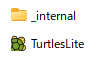
* Do not delete the
"_internal" folder, as it contains system files.
Turtles Lite Version History
| v2.0 (Apr 2026) | Renamed to "Turtles Lite" (restructured as a Windows version) Added drag-and-drop support Changed the file format from ttls to a safer ttlx format Other improvements and stability enhancements |
|---|---|
| v1.1 (Feb 2019) | Improvements and stability enhancements |
| v1.0 (Feb 2018) | Initial release |
| Beta (Jun 2017) | Beta version of "Turtles" released |
Your First Steps in Programming
Typing Lessons
PR